• Home
  • Company
    • About Us
    • FAQ's
  • Services
  • Downloads
    • Digital Signature Forms
  • Support
    • Browser Settings & Chain
    • Token Drivers
    • Utilities
    • User Guide
    • Error Solution
  • Contact

Select Certificate not working on MCA

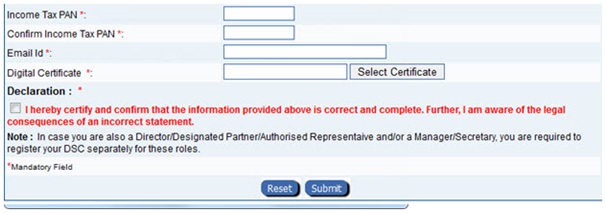
When you click on "Select Certificate" and DSC is not selected while using it on the MCA21, or 'Select Certificate' button not working on MCA website or Unable to Register/Select Digital Signature Certificate(DSC) on MCA website, it is a problem of Java.
Solution:
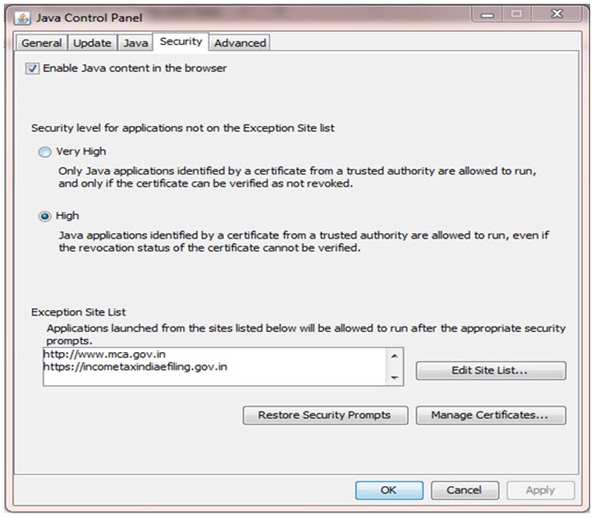
Step-1: In this case, uninstall all the version of Java and install the latest version of JAVA from JAVA WEBSITE.
Further, add domain of website on which Digital Signature is used in the exception list of site in Security Section of Java.

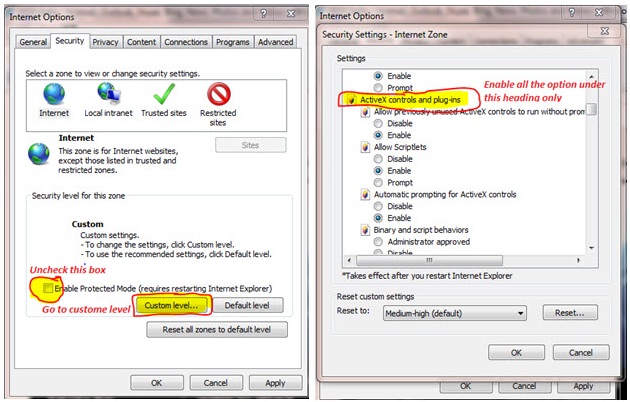
Step-2: Enable all the options of Active-X Controls and plug-ins

Internet Explorer >> Tools >> Internet Options >> Security >> Custom Level >> ActiveX Controls and Plug-ins

Step-3: Restart your computer

  • About Us

    E-Consultancy provides Various types of Digital signatures, Taxation Softwares, Domain facilities etc.

    We believe in treating our customers with respect and faith, We grow through creativity, invention and innovation.

  • Company Info

    • About Us
    • FAQ's
  • Downloads

    • Digital SIgnature Forms
  • Support

    • Browser Settings & Chain
    • Token Drivers
    • Utilities
    • User Guide
    • Error Solution
Copyright © 2014-2015 e-Consultancy